NodeTool Cloud is in alpha. Try it

Free & Open Source

Describe it.
An agent builds it.

An open-source visual pipeline that stays yours.

  • Built-in editors for every step
  • Your own provider accounts
  • Open source, yours to keep
NodeTool: a prompt becomes shots on the canvas, a cut on the timeline, and a finished film
The way it works today

Creating one project
shouldn't require five separate apps.

Work on a single visual board. Use your own AI accounts. Keep the complete project file when you're done.

See how NodeTool compares
  • Juggling five browser tabs

    One app for images, another for animation, a third for voiceovers, and a separate video editor to stitch them together.

  • Export, import, repeat

    Moving files between apps loses your settings, prompts, and original ideas along the way.

  • Paying marked-up credit packs

    Buying expensive proprietary credits locked to whatever tools that platform chooses for you.

  • Losing access when tools change

    Subscriptions jump in price, features disappear, and your projects are trapped in someone else's system.

A standard chatbot gives you text.
This agent builds your actual project.

NodeTool's AI assistant doesn't just chat. It operates the studio tools for you: it sets up the steps directly on your canvas, generates the assets, and keeps every part visible so you can tweak, rerun, or reuse it.

How agents and workflows work together →
Ask: It reads the studio before it answers

It reads the studio before it answers

The agent checks what this install actually has — nodes, packs, example workflows — instead of guessing from a system prompt. The answer is a map of your workspace, not of the product.

A trailer generated end-to-end in NodeTool — script, key art, animation, and sound from one workflow on the canvas.

01Start with an idea

Describe your goal — a product video, a movie trailer, a social campaign. That's all it takes to begin. Prefer to wire it yourself? It's the same canvas.

Audio Input
Whisper
GPT Image 2

02Watch it build in real time

The agent selects the right tools, connects the steps on your board, and runs them from start to finish — generation, editing, and assembly chained into a finished piece, on your own accounts at provider prices.

Logs2.4s
  • Workflow started
  • Text written
  • Image generated
  • Clip assembled
  • Workflow finished
Preview
Example image generated by a workflow node
1024×1024PNG

03Take full control

Click into any step to swap a tool, change an image, or adjust a prompt. Everything remains editable, and the workflow is yours to save and reuse.

Generated asset opened in the built-in editor
Editors

Professional editing tools built right next to the AI

Edit and refine your work directly on the canvas without switching software. A storyboard becomes a script, the script becomes takes, the takes land on a timeline — and an agent works every one of them through the tools you click.

Visual storyboards

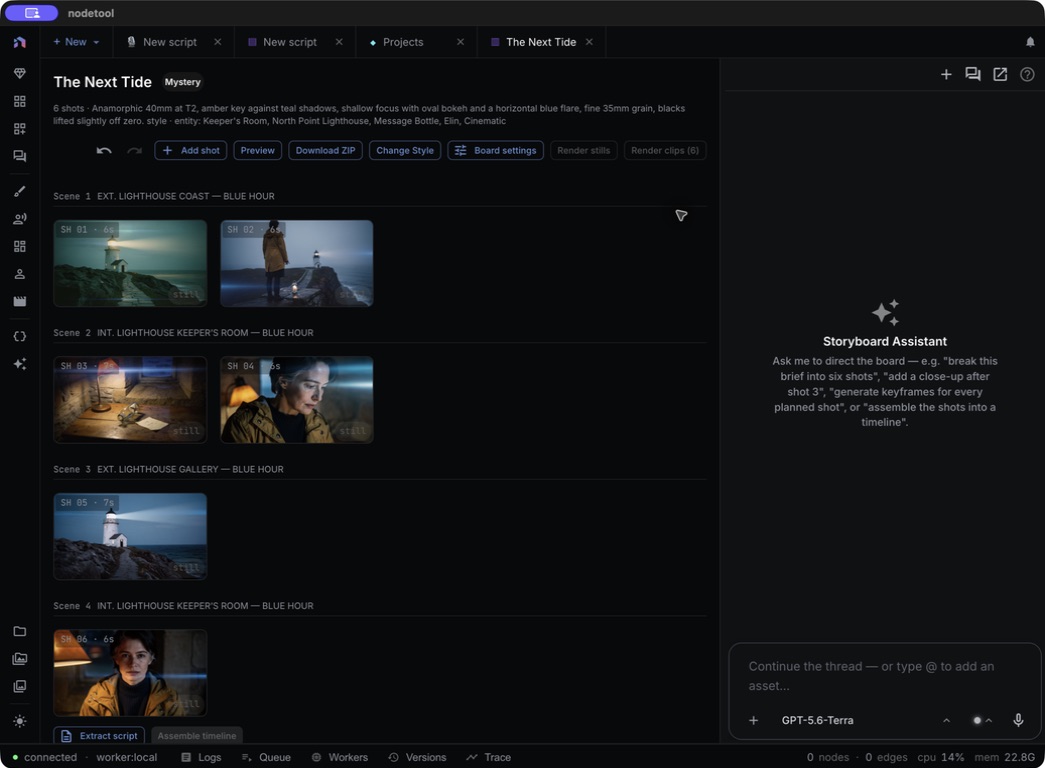
Plan out scenes card by card. Generate low-cost draft images first to lock in the look before spending time and compute on full animation.

More on storyboard
Comparison

Bring all your creative tools under one roof.

You're probably using two or three of these already. Here's what changes when they all live on one canvas.

vs Image-only node tools (like ComfyUI)

Specialized node tools only create pictures. NodeTool provides a complete studio that connects images, video, audio, text, and editing on one canvas.

vs Closed platforms

Other platforms force you into monthly credit bundles and restricted feature lists. NodeTool is open source: you use your direct provider accounts and pay raw rates with no middleman markup.

vs A dozen separate web apps

Instead of copying files between disconnected websites, NodeTool connects your favorite AI tools into a single, repeatable workflow.

How does NodeTool compare with ComfyUI and Figma Weave?

ComfyUI goes deep on diffusion images and runs locally. Figma Weave is a hosted canvas with a curated model list, billed in its own AI credits. NodeTool is open source, covers image, video, audio, and text, and calls every provider on your own keys.

NodeTool compared with ComfyUI and Figma Weave
 NodeToolComfyUIFigma Weave
Media on one canvasImage, video, audio, textDiffusion imagesHosted creative canvas
ModelsEvery major provider and media typeStable Diffusion and other diffusion modelsHand-picked list
What you payProvider list prices, on your own keysYour own compute and provider accountsFigma Weave AI credits
SourceOpen source (AGPL-3.0)Open sourceClosed
Where it runsDesktop app and browser, self-host any timeYour own machineBrowser only
Where NodeTool fits

Every model. Your keys. Your canvas.

Take Seedance, one of today's best video models. It is sold by FAL, Replicate, and KIE at different prices, and NodeTool lets you pick the cheapest of the three. When the next Veo or Kling arrives, you switch to it in one click.

That is what staying independent buys you: the best model at the best price each week, and nothing to lose if your favorite tool is bought by someone else.

Access top AI tools directly.
No middlemen, no markups.

Pick the best AI service for the job — OpenAI, Google, Anthropic, or a specialized image and video engine — and switch between them with one click. NodeTool charges you what the providers charge, and is released under a license that outlives whoever built it.

Use your own provider keys

Connect directly to OpenAI, Anthropic, Gemini, FAL, KIE, Replicate, and specialized video generators. Your account keys stay on your disk in Studio, encrypted in Cloud.

Pay official rates directly

Skip artificial credit systems. If an image costs $0.03 to generate through a provider, you pay exactly $0.03 to that provider. NodeTool takes no cut.

100% open source

Free to use and inspect. Studio and Cloud are built from the same AGPL-3.0 source, with no artificial paywalls or locked features, and you can host it yourself at any time.

Run private models on your computer

Download and run free, open-weight models locally on your own hardware — MLX, Ollama, llama.cpp, vLLM, and LM Studio — with no internet connection.

The newest models, the day they arrive.

The leading image, video, audio, and language models from every major provider, or the same kind of models running on your own computer when you prefer that.

Latest Models
GPT-5.6Claude Fable 5Claude Opus 5Claude Sonnet 5Gemini 3.5 FlashGemini 3.1 ProQwen ImageVeo 3.1Kling 3Seedance 3Hailuo 2.3Wan 2.5FLUXWhisperElevenLabs

Cost transparency

See what every run actually costs

NodeTool records what each step costs and adds it up by workflow, provider, or model. Because you use your own keys and pay providers directly, these are the amounts you are actually billed.

Costs
Costs
Spend per node execution across 9 workflows · last 90 days
7d14d30d90d
Total spend
$7.71
across 9 workflows
Node executions
194
0 failed
Avg / execution
$0.040
across all node types
Top cost driver
BytedanceSeedance2
$3.08 · 40% of spend
Spend over timedaily · last 90 days
Kie$4.35OpenAI$1.85fal.ai$1.50
$5.39$2.70$0
Group by
ExecutionNode typeWorkflowProviderModel
5 of 31
Node typeRunsShare of spendCost
BytedanceSeedance21
40%
$3.08
GptImage2Edit10
18%
$1.41
gpt-5.4-mini37
16%
$1.25
GrokImagineTextToVideo21
13%
$1.01
gpt-5-mini29
4%
$0.34

Cost per step

Every run is priced on its own and can be grouped by step, workflow, provider, or model.

No markup

Pay OpenAI, fal.ai, and the rest directly with your own keys. NodeTool takes no cut.

Export anytime

Download the full breakdown as a spreadsheet for your own books or client invoices.

The same model, priced twice

NodeTool bills you nothing per generation — you hold the keys and pay each provider its list price. Set a workload and compare it with the same models bought as Figma Weave credits.

  • 750 images / month
    $0.035 / image

    Stills, variations, and every reroll you throw away.

  • 24 clips / month
    $0.0175 / second

    A provider bills the second, a credit plan bills the clip — so the length matters to one side and not the other.

  • 120 minutes / month
    $50 / 1M characters

    Narration minutes, billed by character (~950 per minute). Figma Weave has no voice model, so this line has nothing to compare against.

Your keys, direct

$35.31/ month

  • Images · Seedream V5$26.25
  • Video · Seedance 1.5$3.36
  • Voice · Eleven Turbo v2.5$5.70
  • NodeTool Studio$0

The same models on Figma Weave

$45.00/ month

3,744 of 4,000 credits. Against $29.61 for the same images and clips on your own keys.

4 credits an image, 31.01 a clip, derived from Figma Weave's own table. It prices a clip, not a second, and does not publish clip length.

The picker holds the 10 models Figma Weave sells that Kie or AtlasCloud also serves, so both columns price the same model. Its other 13 are left out because neither provider carries them. Prices via genspend.io, updated 2026-08-23. Figma Weave plans read 2026-08-24. Local models through Ollama, MLX, and llama.cpp cost nothing per call.

One canvas
for the whole craft

Image, video, audio, and text on a single visual canvas, with the editing tools you already rely on sitting right next to the models. You direct the whole piece instead of generating parts of it.

Workflow Editor
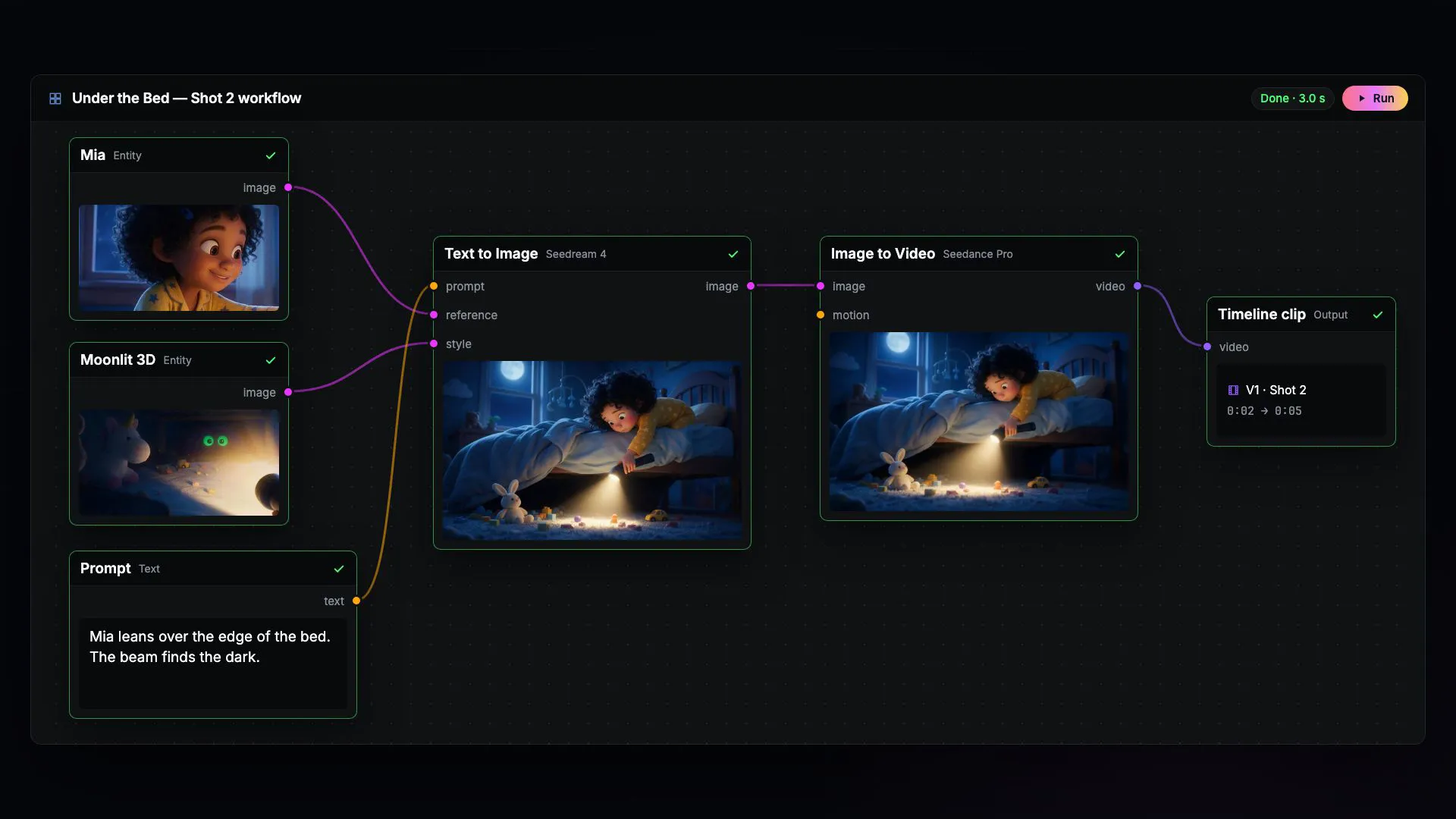
Node workflow turning a campaign brief and product photo into a generated product video

Edit where you generate

Mask, retouch, extend, relight, upscale, layer, and composite. The editing tools you reach for live on the same canvas as the models.

Watch every step render

Results appear as each step finishes. Inspect any frame, swap a model, and re-run from that point on.

Your keys, provider prices

Bring your own keys for FAL, KIE, OpenAI, Anthropic, Gemini, Replicate, and the rest. The bill comes from the provider, not from us.

Image, video, audio, text

Flux, Seedance, Wan, ControlNet, Whisper, ElevenLabs, and Suno, all on one canvas under their real names. You always know which model you are running.

Storyboard before you spend

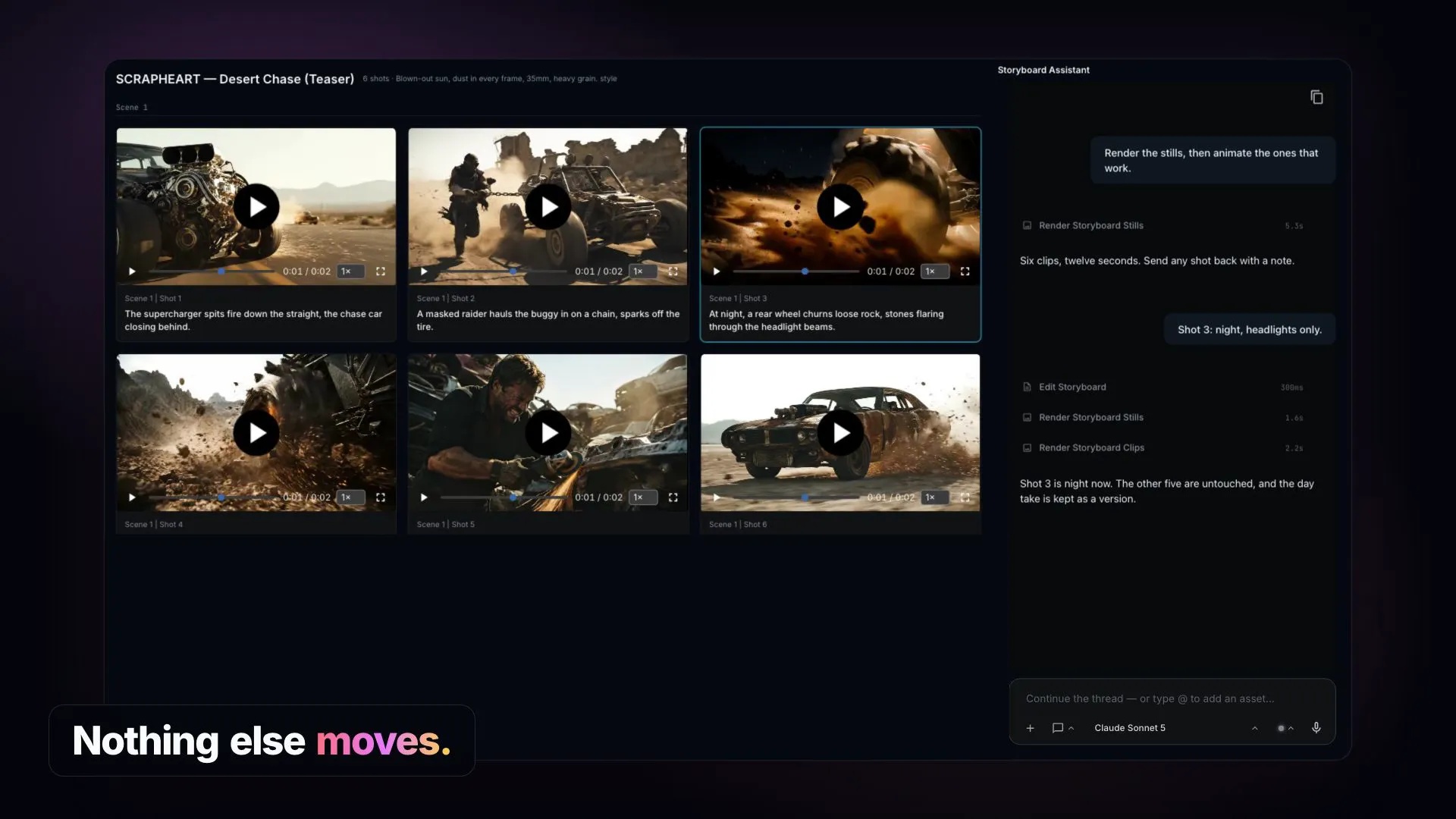
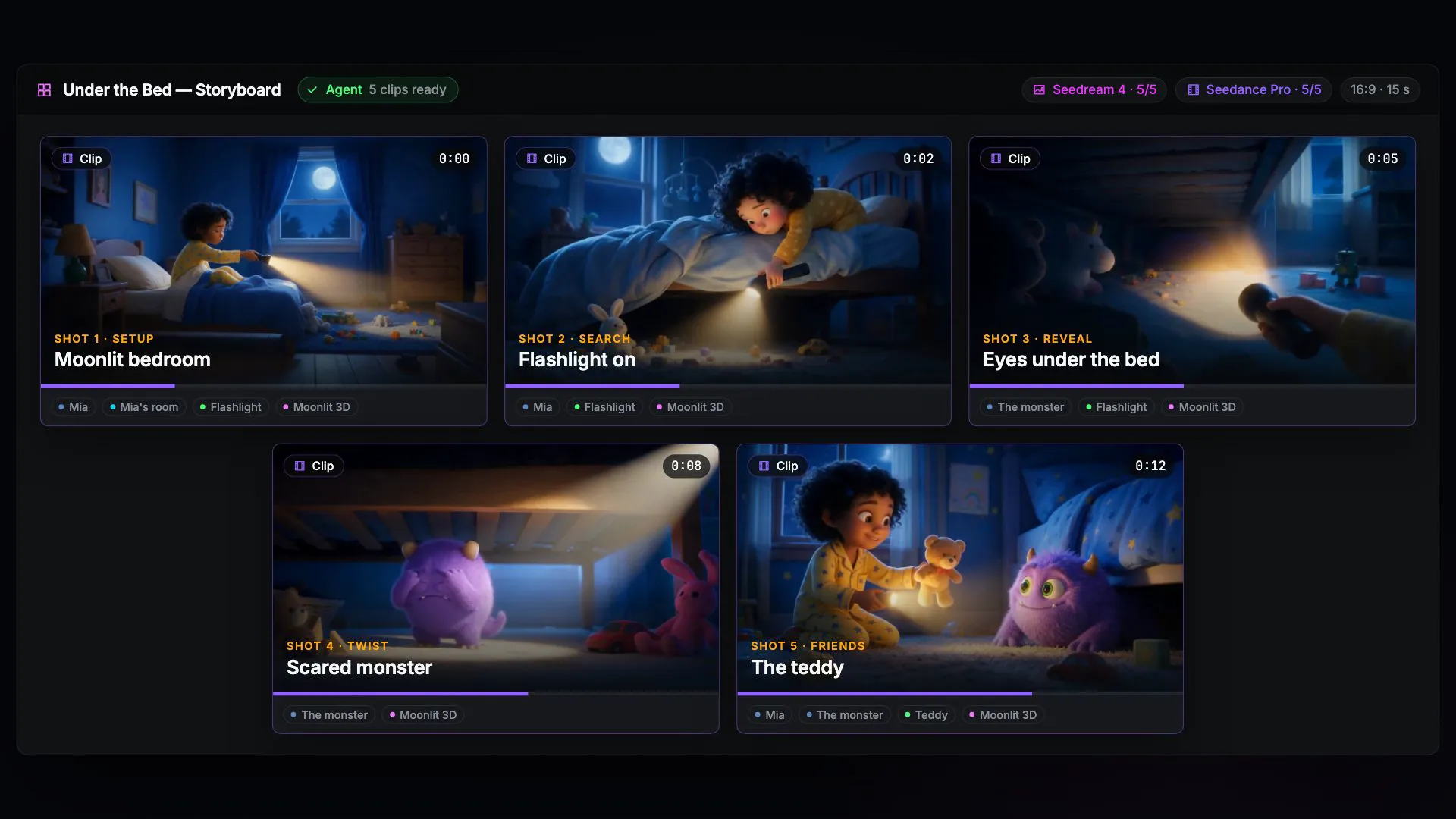
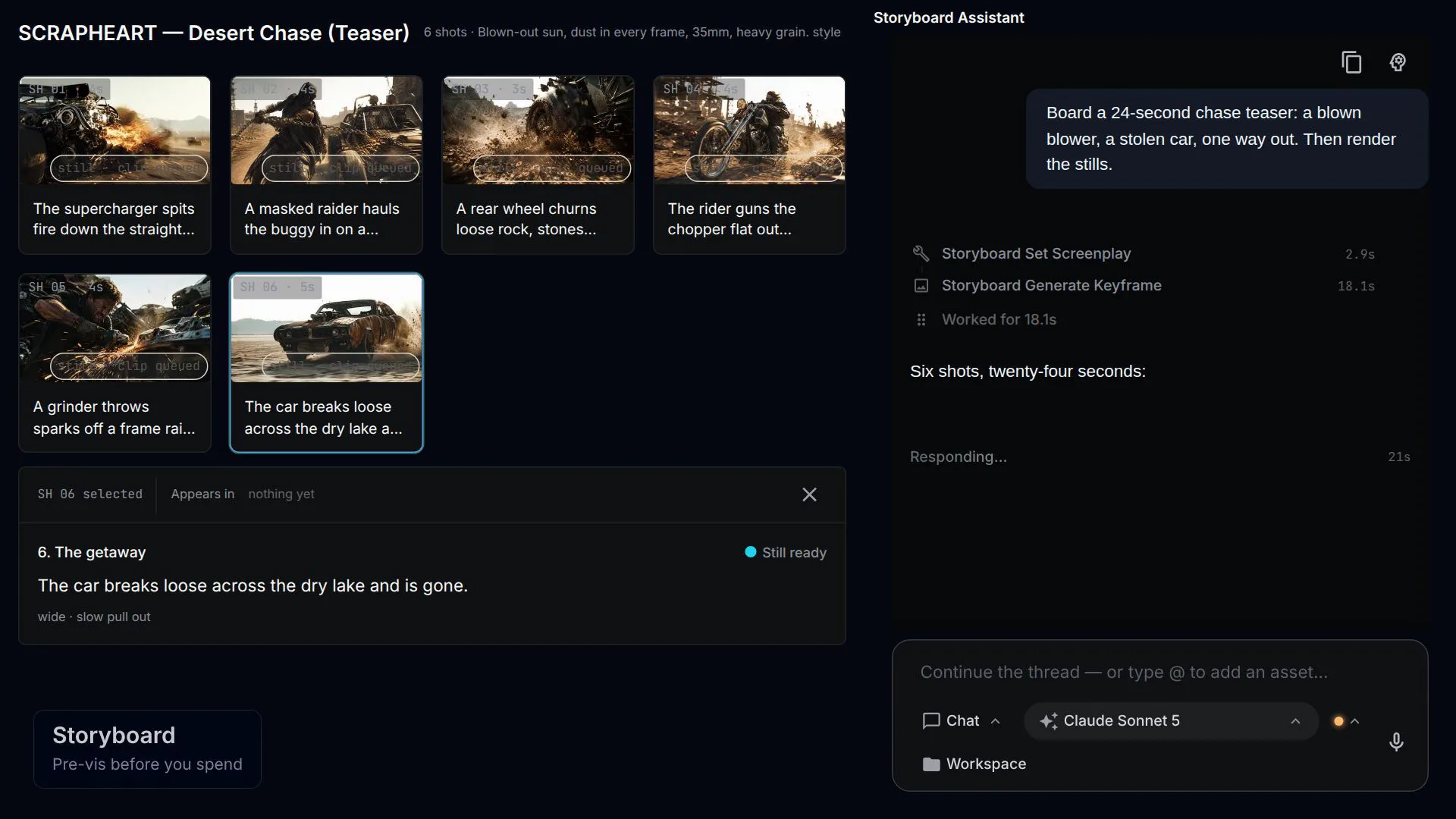
Write a brief and a visual style, press Direct, and get a shot list back — action, camera, motion, and duration per card. Approve the stills you like, render only those into clips, then assemble the whole thing into the timeline editor in one click.

NodeTool's storyboard surface: title, brief, and visual style fields above a Direct button, and five shot cards for a lighthouse film — each with its still, its action line, camera notes, and a status of Rendered, Approved, Still ready, Rendering, or Planned

Stills cost cents, clips cost dollars

Generate stills until one looks right and pick it. Only then do you pay to animate the shot into a clip.

Revise one shot, not the reel

"Darker, add rain" runs video-to-video on that clip and swaps it in place. Fixing shot 3 never re-rolls shots 1–5.

A cast that stays consistent

Characters, locations, styles, and props are named entities with a fixed descriptor that goes into every prompt that names them.

Write the script, then voice it

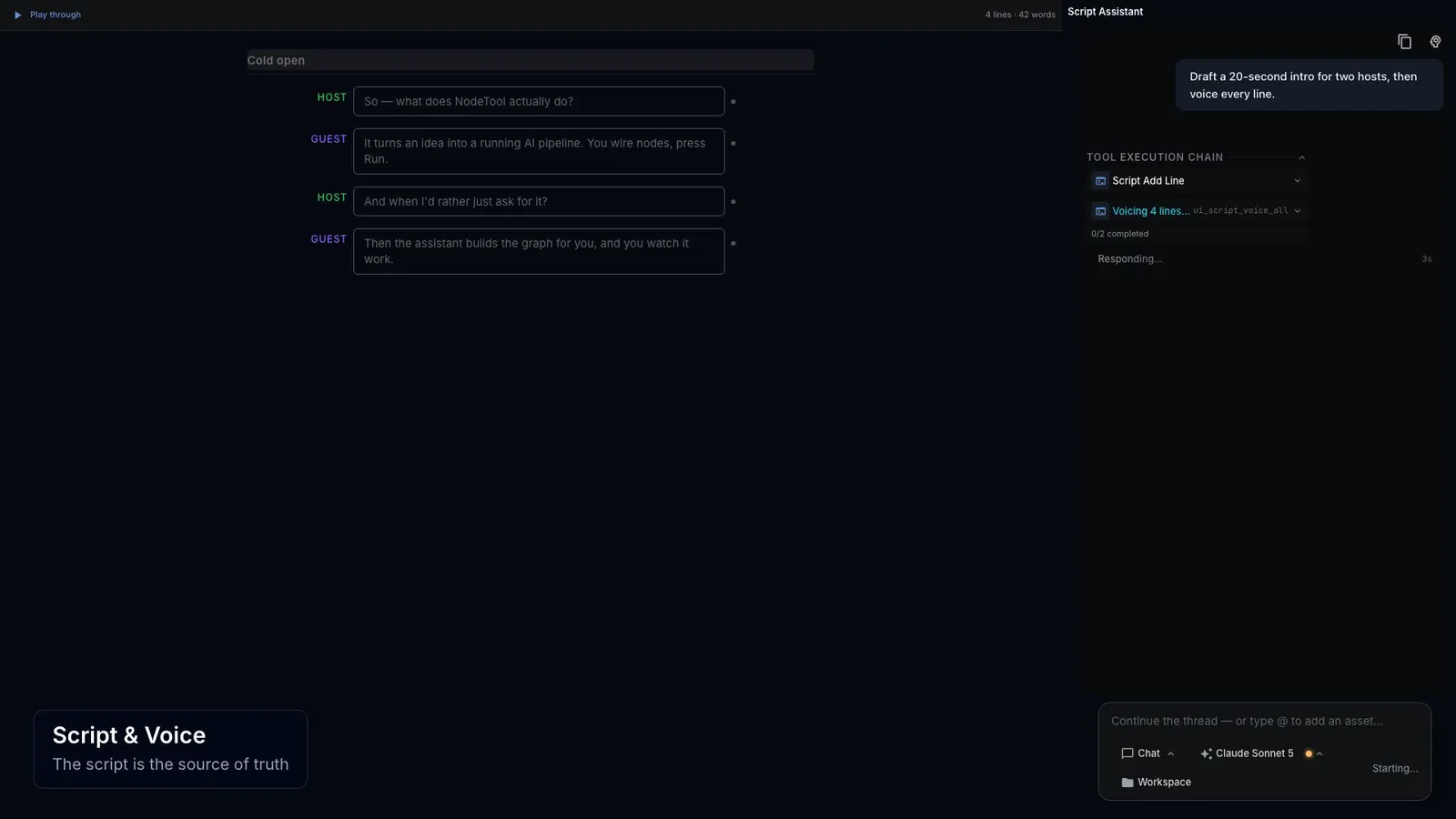
A script is its own document, not a byproduct of a timeline. The words are the source of truth and the audio is derived from them: draft the lines, cast a voice per speaker, voice the script, and send the takes to a timeline as clips that carry word-level captions.

A voice per speaker

Cast each speaker once — provider, model, voice — and every line they own inherits it until you override that line.

Takes you can audition

Voicing a line saves a take with its own word timings. Keep several, compare them, pick the read you want.

Edits mark themselves stale

Change a line's words or its voice and the line flags itself against the take that no longer matches. Re-voice that line, not the script.

Built-in video editor

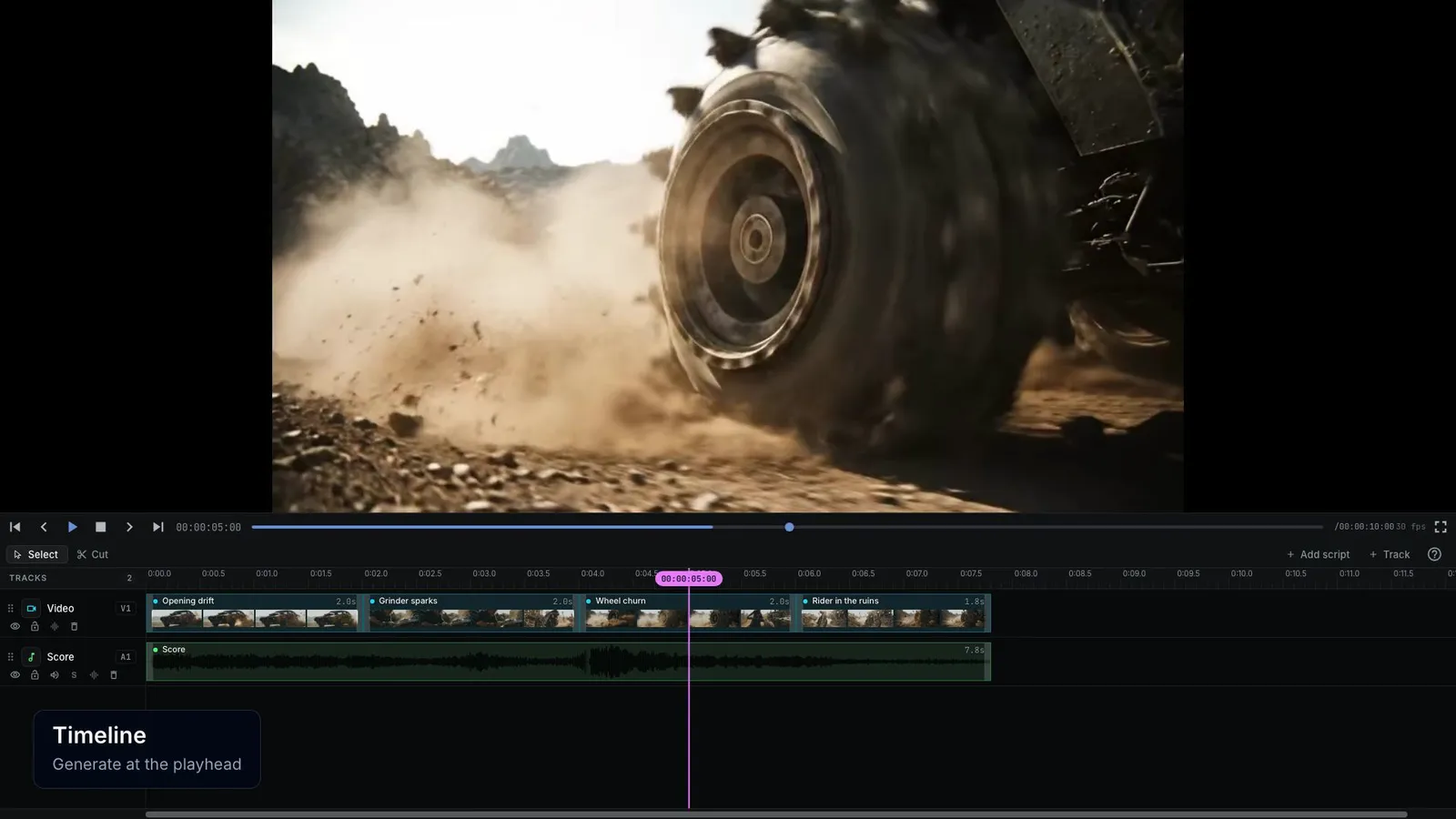
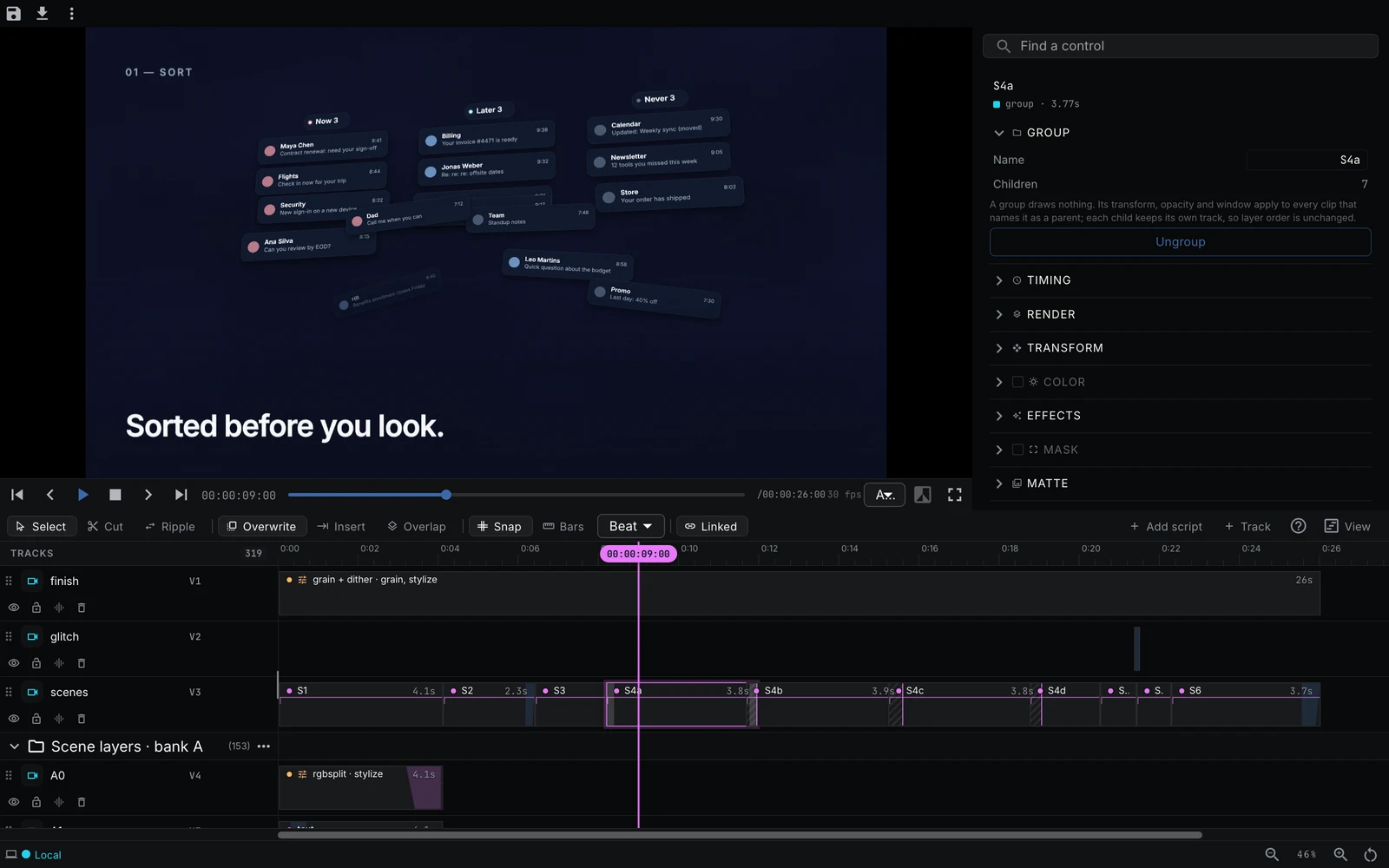
Generate AI video and audio straight onto a multi-track timeline. Prompt a model at the playhead, drop the clip on a track, then trim, split, and export a finished cut.

NodeTool's built-in timeline editor: a video preview with a clip inspector panel (Transform and Color controls) on the right, a multi-track timeline with AI-generated video clips on a video track and an audio waveform below, plus a 'Generate a video at the playhead' prompt bar with a model selector and an Export button

Generate at the playhead

Prompt a model and the new clip lands on the track right under the playhead — no import step.

Multi-track video & audio

AI video and AI audio share one timeline. Stack tracks, trim, split, and rearrange clips.

Export a finished cut

Render the whole sequence to a single video — the edit happens where you generate, not in another app.

Built-in sketch editor

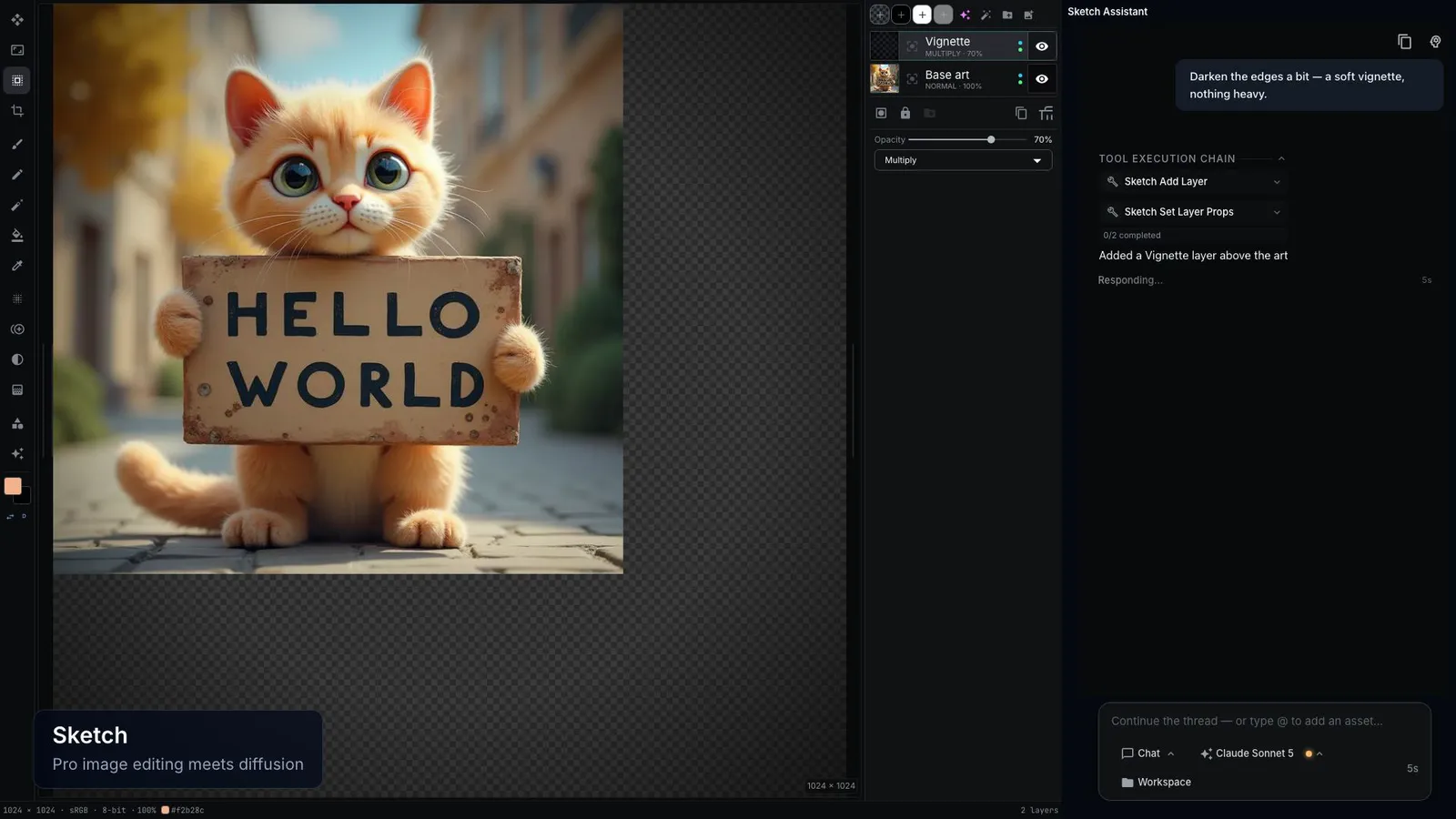
A full layer-based image editor with generation built in. Paint with real brushes, stack layers and blend modes, then prompt a model to create or refine any layer — and export a finished PNG without leaving the canvas.

NodeTool's built-in sketch editor: a layered canvas holding an AI-generated 'Kung Fu' movie poster, with a brush toolbar and brush settings across the top, a color picker and a layers panel with text-to-image layers on the right, and a 'Describe the image' generate bar with a Flux Schnell model selector and an Export PNG button

A real brush engine

Round, soft, airbrush, and spray brushes with size, opacity, hardness, and angle. Pick any color and paint straight onto the canvas.

Layers & blend modes

Stack layers, set opacity and blend modes, reorder and mask — the same controls you reach for in a pro image editor.

Generate onto a layer

Describe an image and it lands on its own layer. Mix hand-painted strokes with text-to-image and image-to-image right where you draw.

Wrap the graph in a screen

A workflow is for you. An app is for everyone else — the same graph with inputs, a run button, and a place for the result. Here is Image Enhance, and the app it became.

The workflow
Note
Image Input
Gaussian Blur
Image
Brightness Contrast
Image
HSB
Image
Unsharp Mask
Image
Output
The app
Photo Studio mini app

Nothing is regenerated in between. The app names the workflow's inputs and outputs, so a change to the graph shows up in the screen — and an agent can place the widgets for you. Open Photo Studio

Turn workflows into simple apps you can share

Once you build a workflow, turn it into a clean interface with a few input boxes and a Generate button. Hand that screen to a teammate or client so they get results without navigating the canvas underneath — which stays yours to open and change.

NodeTool's app builder in Design view: a palette of widgets (text input, slider, switch, select, date input, resource picker) on the left, a mini app screen in the middle with a prompt field and a Run button, and a page inspector with app title and theme on the right

Drag a widget, wire a port

Fields, sliders, pickers, and result displays bind to the inputs and outputs of the workflows the app runs. Results stream in as the run happens.

An agent builds and grades it

Describe the app and it plans the workflows, places the widgets, replays every interaction, and has a second model judge whether the result matches the ask. No passing verdict, no app.

One file to hand over

Export an app as a bundle — the screen plus the full graph of every workflow behind it — and import it on another machine.

All the
building blocks

Hundreds of ready-made blocks for models, data, and files, plus one for every model on Replicate, FAL, and Kie.ai.

Node menu showing all available node types

Organize Everything

Built-in Asset Manager

Drag files in once, use them in any workflow.

NodeTool Asset Manager interface preview

Import & organize

Drag and drop. Files sort themselves by type, project, or tag.

Preview files

Built-in preview for images, audio, video, and documents.

Use in workflows

Point any workflow at a single file or a whole folder.

Images & Graphics

PNG, JPG, GIF, SVG, WebP

Audio & Video

MP3, WAV, MP4, MOV, AVI

Documents & Data

PDF, TXT, JSON, CSV, DOCX

Hello
HuggingFace

Search, download, and manage models straight from Hugging Face.
Organize your local library without leaving the app.

Model Manager
Model manager interface showing Hugging Face integration

Frequently asked questions

What is NodeTool?

NodeTool is the open creative AI workspace. Every major model from every major provider, including FAL, KIE, OpenAI, Anthropic, Gemini, and Replicate, sits on one visual canvas that you run on your own machine or in the browser. Image, video, music, and text share that canvas, alongside agents that carry out longer jobs step by step.

Read more →
Is NodeTool open source?

Yes. The whole project is AGPL-3.0 on GitHub. Studio and Cloud are built from the same source, and nothing is held back for a paid tier. You can host it yourself at any time.

Read more →
How much does NodeTool cost?

NodeTool Studio, the desktop app, is free and open source. NodeTool Cloud is a subscription that covers hosting; it is in alpha and its price is set at full release. In both editions you bring your own API keys and pay each provider their list price directly, so what a run costs is whatever the provider charges for it. Local models through Ollama, MLX, or llama.cpp cost nothing per call.

Read more →
Is NodeTool local-first and private?

NodeTool Studio runs on your own machine: the workspace, your workflows, your files, and your API keys stay there, and open-weight models can run locally through MLX, Ollama, llama.cpp, vLLM, and LM Studio. When you call a hosted model, that request goes from your machine straight to the provider you chose, on your key — it does not pass through NodeTool servers. Cloud is the same open-source app hosted in the browser, and your keys still call the providers directly.

Read more →
Which models are supported?

The leading models, including Flux, Seedance, Wan, Veo, Kling, Hailuo, Qwen Image, Whisper, ElevenLabs, and Suno, reached through providers such as FAL, KIE, OpenAI, Anthropic, Gemini, Replicate, Together, Groq, Mistral, OpenRouter, and HuggingFace. Models can also run on your own computer through MLX, Ollama, llama.cpp, vLLM, and LM Studio.

Read more →
What does it mean that NodeTool is agent-first?

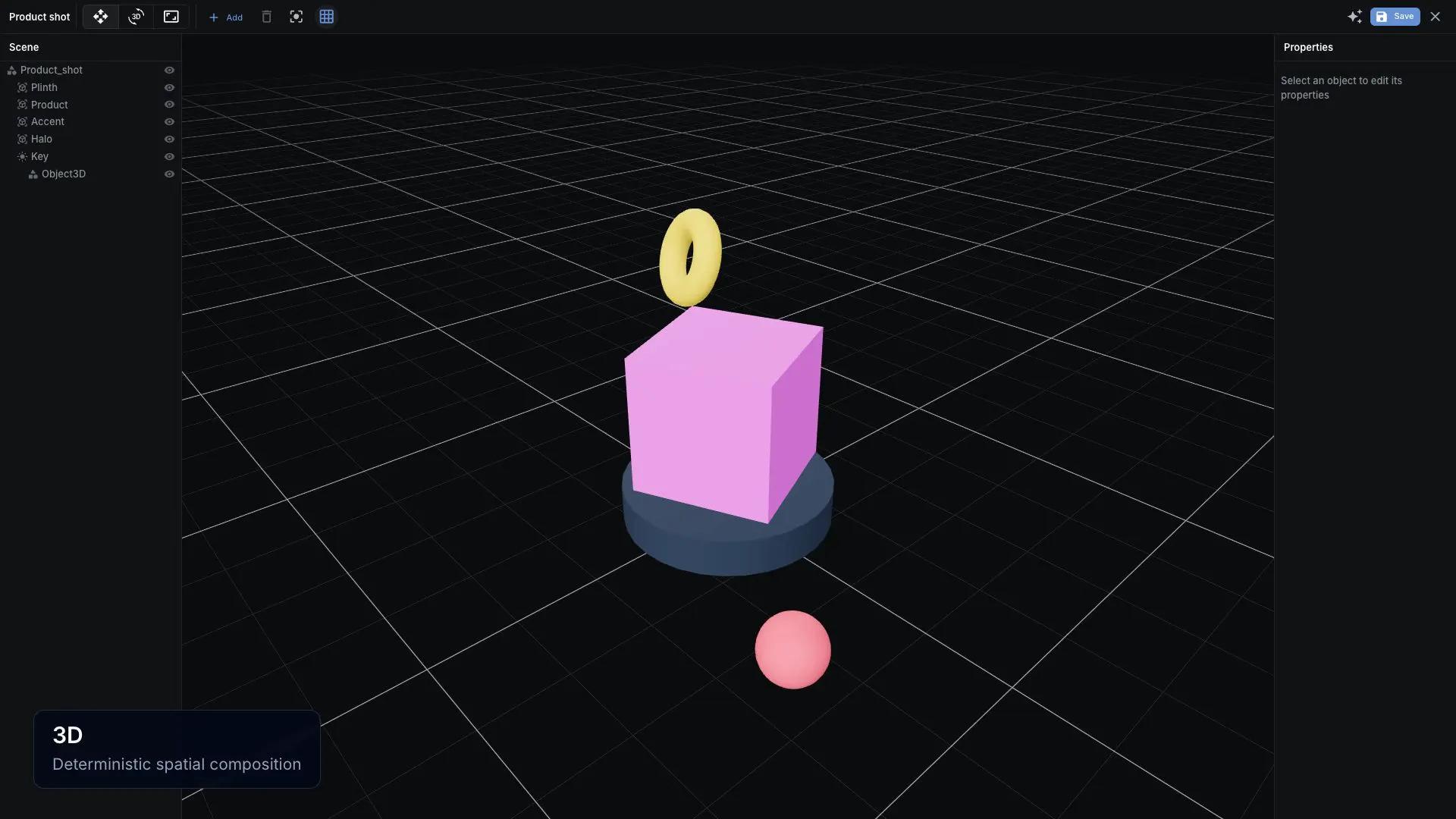
Every editor in NodeTool — the node canvas, sketch pad, storyboard, video timeline, script editor, 3D scene, and app builder — is exposed to agents as tools, around 120 in all. An agent doesn't describe what you could do; it builds the workflow, runs it, and repairs what fails, on the same surfaces you use. The same tools are exposed over MCP, so outside agents such as Claude Desktop and Claude Code can drive NodeTool too.

Read more →
Do I need a GPU to run NodeTool?

No. NodeTool works entirely with cloud providers — bring your own API key, and the model runs on the provider's hardware with nothing to install locally. A GPU only matters if you choose to run open-weight models yourself through Ollama, MLX, or llama.cpp: it speeds those up, but many smaller local models run fine on CPU too, just slower.

Read more →

Made with working creatives

NodeTool is open source under AGPL-3.0. Star the project on GitHub, join us on Discord, and share workflows with the artists, motion designers, and studios already using it on real jobs.

Get in
touch

Questions, bug reports, feature requests — we answer.

General Inquiries

Say hi or tell us what you need.

The Team

Email the developers directly.

Built out in the open.

Describe what you want to create. Watch the agent build it. Keep the whole project. NodeTool is free, open-source software built alongside working artists, designers, and video editors — download the desktop app, or try it in your browser with nothing to install.