
NodeTool for developers · MCP server
Your coding agent writes the app. Now it makes the media too.
Connect NodeTool to the agent you already use. Ask for images, video, speech, or a whole media workflow in plain words. The files land in your repo, and the steps stay saved for the next run.
$ npx -y --package=@nodetool-ai/cli nodetool mcp install- Claude Code
- Codex
- OpenCode
- Cursor
- Claude Desktop
Open source · Your provider keys at list price · Studio is optional
> Make sprites for my platformer: a flame spirit hero, a shadow crawler, a glowing mushroom. Transparent, into assets/.
nodetool · generate image ×3

✓ hero.png

✓ crawler.png

✓ mushroom.png
Saved 3 sprites. Want a background for the level next?
One session
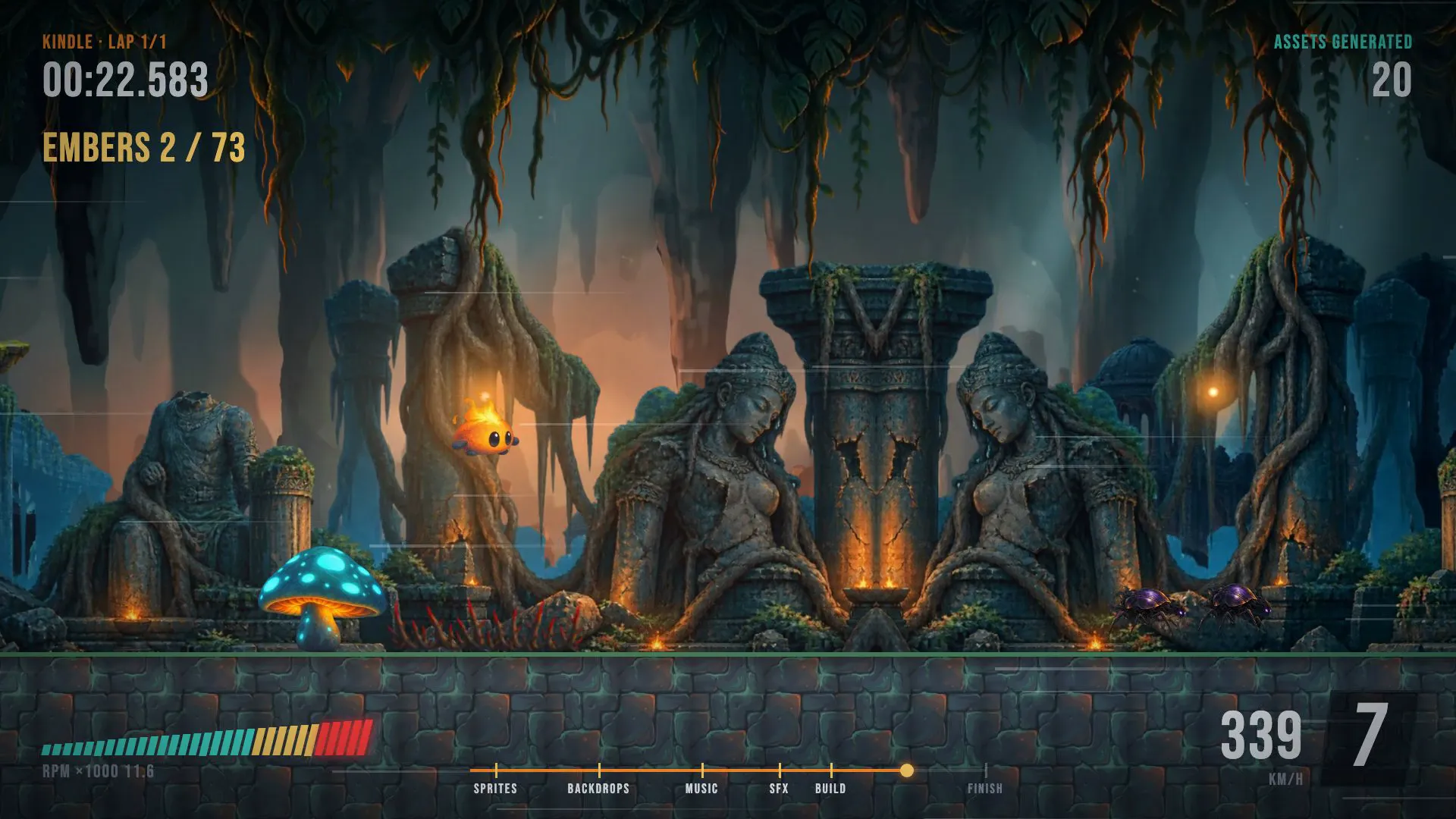
A game's assets, start to finish.
An agent makes the sprites, backdrops, music, and sound effects for Kindle, a 2D platformer. Then it wires them into a level you can play in the browser.
What to ask
Describe the result. The agent picks the tools.
You do not learn a new API first. These are requests you can type into your agent after the install.
Images
“Make three app-icon options for a habit tracker and put them in public/icons.”
Files in your repo, and a copy of each in the asset library.
Video
“Animate the hero image into a 5-second silent loop for the page background.”
A clip from the video model you choose, such as Kling, Veo, or Seedance.
Speech
“Voice the onboarding script in docs/onboarding.md with a calm narrator.”
An audio file for each paragraph, ready to drop into the app.
Transcripts
“Transcribe the demo recording and add chapter markers to the README.”
Timestamped text that the agent edits into your docs.
Workflows
“Build a workflow that turns any product photo into three lifestyle shots.”
A saved graph you can open in Studio, change, and run again.
Models
“Which image models can I use with my keys? Pick one for product photos.”
A model list from your configured providers, with the agent's pick.
Repeatable
The prompt that worked stays saved.
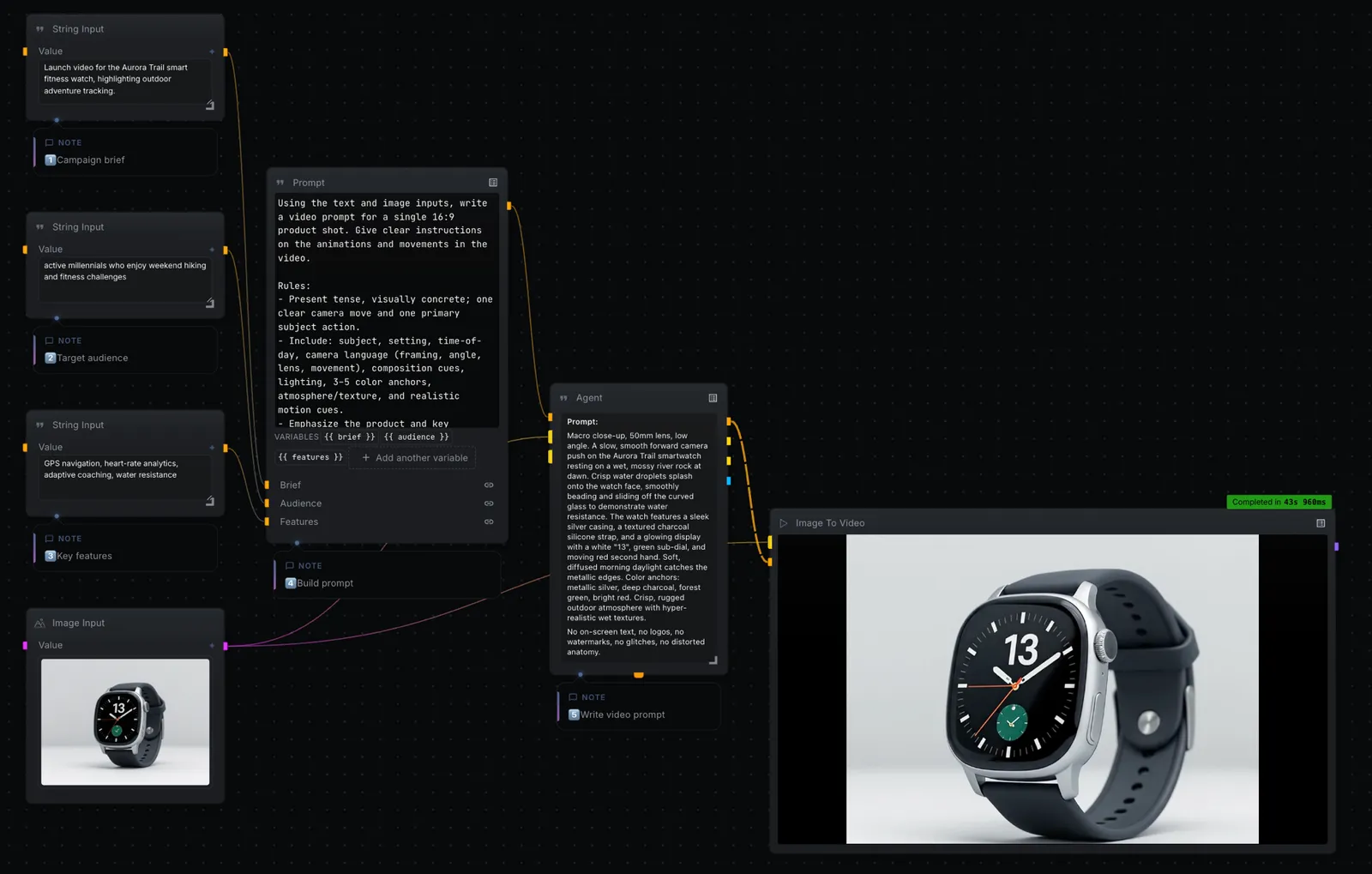
One chat session makes one asset. A workflow makes the next hundred. The agent builds the same node graph you can open and edit yourself.
- Saved, not lost
- Ask the agent to save the steps as a workflow. The prompt, the model, and every setting stay in the graph.
- Same graph, two editors
- When Studio is open, the agent's edits appear in the canvas as they happen. Change a node by hand and the agent sees it on the next call.
- Run it again
- Feed the workflow a new input from the canvas, the CLI, or an HTTP call. You do not describe the job again.
Setup
Connected in about a minute.
NodeTool runs on your computer as an MCP server, the standard way coding agents connect to outside tools. You do not need the desktop app, a GPU, or an account with us.
$ npx -y --package=@nodetool-ai/cli nodetool mcp install- 01
Run the install command
It finds Claude Code, Codex, and OpenCode, starts NodeTool once to check it, and writes each config. It needs Node.js 22.
- 02
Restart your agent
Then ask it: "Use NodeTool to list my workflows."
- 03
Add your provider keys
Generation calls your own provider accounts at their list price. Store each key once, for example nodetool secrets store FAL_API_KEY.
Cursor, Claude Desktop, or another MCP client: run nodetool mcp config and paste the block it prints into the client config.
Ship it
Call the workflow from your app.
A workflow the agent built is also an endpoint. Your app sends the input and gets the image, audio, or video back.
curl -X POST http://localhost:7777/api/workflows/<id>/run \
  -H "Authorization: Bearer $NODETOOL_TOKEN" \
  -H "Content-Type: application/json" \
-d '{"params": {"photo": "https://example.com/shoe.jpg"}}'- HTTP
- POST to a workflow's run endpoint and get its outputs back as JSON. Use the WebSocket API to stream progress.
- CLI
- nodetool run executes a workflow file in a script or a CI job, with no editor open.
- Your server
- The whole stack is open source under AGPL-3.0. Run it with Docker Compose on your own machine or cloud account.
Reference
When you want to see under the hood.
- MCP setup guideClients, config files, keys, and troubleshooting.
- JavaScript sandboxThe QuickJS isolate where agent actions and Code nodes run.
- Workflow APIRun, list, and export workflows over HTTP and WebSocket.
- Custom nodesWrite a TypeScript node and use it on the canvas and from code.
- Self-hostingDeploy the container image on your own infrastructure.
Questions before you connect.
Is NodeTool open source?
Yes. The whole project is AGPL-3.0 on GitHub. Studio and Cloud are built from the same source, and nothing is held back for a paid tier. You can host it yourself at any time.
Read more →What does "bring your own keys" mean for me?
It means you connect your own provider accounts and pay each provider directly at its published price. NodeTool does not add a credit system or a provider-price markup. The provider still receives the requests you send to its models. You will sometimes see this written as BYOK.
Read more →Can I use NodeTool from Claude Code, Codex, or Cursor?
Yes. NodeTool runs as an MCP server. Run npx -y --package=@nodetool-ai/cli nodetool mcp install and restart the agent. The command registers NodeTool with Claude Code, Codex, and OpenCode, and nodetool mcp config prints a config block for Cursor, Claude Desktop, and other clients. The agent gets workflows, image, video, and audio generation, and your asset library as tools. Studio is optional. When Studio runs, the agent's changes appear in the open editor.
Do I need a GPU to run NodeTool?
No. Studio can use hosted providers, where the model runs on the provider's hardware. A GPU matters only when you choose to run supported open-weight models on your computer. The requirement then depends on the model and runtime; smaller models may run on CPU at lower speed.
Read more →Give your agent a studio.
One command connects NodeTool to Claude Code, Codex, and OpenCode. Everything it makes stays editable.