NodeTool Cloud is in alpha — run workflows in the browser, on your own keys.NodeTool Cloud is in alpha. Try it →

Node-based workflows you can check, run, and rerun
NodeTool is an open-source canvas for node-based AI workflows. Wire image, video, audio, and text models into one graph, watch each step run, and run the same graph again on new inputs. It works with the models you choose, on your own keys or on your own machine.
Free and open source, AGPL-3.0. macOS, Windows, and Linux.
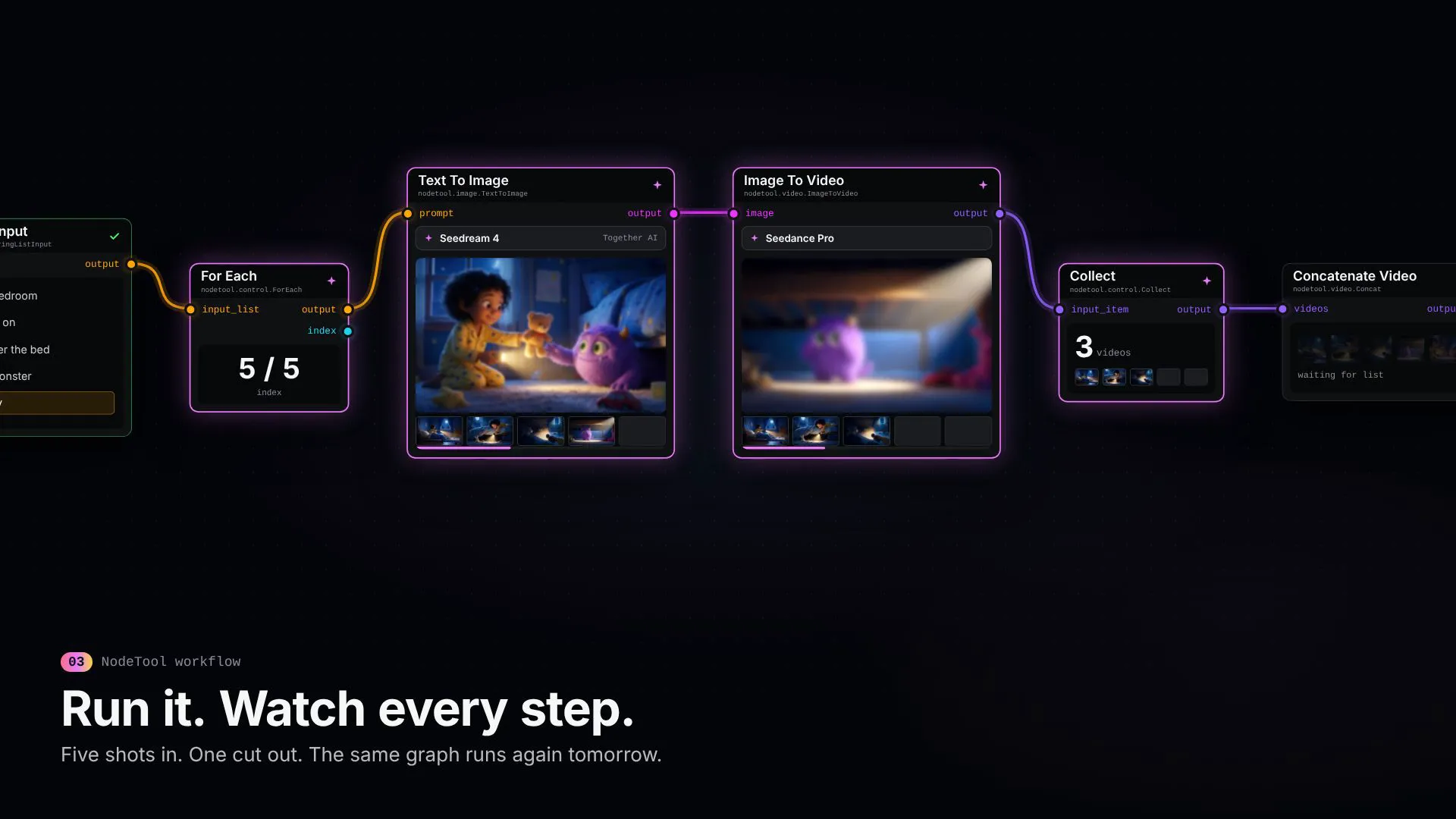
One workflow from wiring to a finished cut. The shots come from the Under the Bed example that ships with NodeTool.
A graph you can trust with paid runs
A workflow that touches paid models has to fail early and visibly. These are the parts of NodeTool that make that happen.
Typed ports
Every input and output declares its type: text, image, video, audio, list, and more. The editor checks the types before it accepts a wire, so a video can't land in a text prompt.
A check before you pay
nodetool validate reads a graph without running it and reports unknown nodes, missing required fields, mis-typed edges, and model ids that don't exist. A run that costs money starts from a graph that passed.
Every step on screen
Each node shows whether it is waiting, running, or done, and holds its own output. When a run goes wrong, you see which step did it and what it produced.
Swap the model, keep the graph
Text To Image, Image To Video, and Text To Speech route to whichever provider serves the model you pick. Change Seedream for FLUX or Imagen in one field, and the wires stay where they are.
Batches and control flow
For Each runs the steps after it once per item and Collect gathers the results. If, Switch, and Fallback branch. Subgraph folds a group of nodes into one.
Runs outside the canvas
The graph you build is the graph you call. Run it with nodetool run, POST to its run endpoint and get JSON back, or hand it to Cursor or Claude Code through the MCP server.
The workflow in the video, node by node
Seven nodes turn a list of five shot prompts into one edited video. Add a sixth prompt and the same graph makes six shots. The Batch a List and Movie Trailer Generator templates are built on the same pattern.
- 01String List Input
nodetool.input.StringListInputHolds the five shot prompts.
- 02For Each
nodetool.control.ForEachSends the prompts on one at a time, with an index.
- 03Text To Image
nodetool.image.TextToImageTurns each prompt into a still with the image model you pick.
- 04Image To Video
nodetool.video.ImageToVideoAnimates each still with the video model you pick.
- 05Collect
nodetool.control.CollectWaits for all five clips and passes them on as one list.
- 06Concatenate Video
nodetool.video.ConcatJoins the list into one video.
- 07Output
nodetool.output.OutputReturns the cut to the canvas, the CLI, or the API caller.
Build along: a trailer workflow
Follow a logline through shot planning, keyframes, video generation, and a joined trailer. Change the brief or any model in the graph.
Gemini and KIE API keys. The shipped graph uses Gemini for direction and Veo video, and KIE for GPT Image-2 keyframes. Each shot incurs image and video generation charges.
- In Studio, open Movie Trailer Generator from the template library.
- Connect Gemini and KIE in provider settings and review the selected models.
- Enter a Logline and Visual Style. Set Shot Count to 1 for a first paid test instead of the template's six-shot default.
- Run the workflow and inspect the trailer output. Save the graph before changing the brief or adding shots.
Hundreds of nodes, one canvas
Ready-made nodes for models, media, data, and files, plus one for every model on Replicate, FAL, and Kie.ai. A sample:
Image
- Text To Image
- Image To Image
- Upscale Image
- Remove Background
- Segment Image
- Apply Mask
- Compare Images
- Image To 3D
Video
- Text To Video
- Image To Video
- Concatenate Video
- Extract Video Frame
- Extract Audio
- Trim
- Overlay
Audio
- Text To Speech
- Speech to Text
- Text To Music
- Overlay Audio
- Concatenate Audio
- Transcribe
Text and agents
- Agent
- Summarizer
- Extractor
- Classifier
- Structured Output Generator
- Enhance Prompt
- Web Search
Logic, data, and code
- For Each
- Collect
- If
- Switch
- Fallback
- Subgraph
- Code
- Hybrid Search
- Webhook Trigger
Let the agent wire it
Describe the workflow in a sentence. The built-in agent picks the nodes, connects them on the same canvas, and runs them. Every node it places stays editable.
How the agent worksOther node-based workflow tools
Node editors are built either around media models or around text and automation. NodeTool covers both on one canvas. Each comparison says where the other tool is the better fit. New to graphs? Start with what node-based AI is.
Frequently asked questions
- What is a node-based workflow?
- A node-based workflow is a process drawn as a graph. Each node does one job, such as generating an image or joining clips, and wires carry each node's output into the next one's input. The graph is saved, so the same process runs again on new inputs.
- How is a node-based workflow different from a list of automation steps?
- A list runs top to bottom. A graph can split one output into several branches, run a step once per item in a list, and merge results back together, and you can see all of that on one canvas. NodeTool also checks that each wire connects matching types.
- Do I need to code to build node-based workflows in NodeTool?
- No. You add nodes from the menu and drag wires between them, or ask the built-in agent to build the graph for you. When you want code, the Code node runs sandboxed JavaScript, and workflows can also be written as TypeScript files.
- Can I run a node-based workflow without opening the app?
- Yes. The same workflow runs from the command line with nodetool run, from an HTTP POST to its run endpoint, and from an MCP client such as Cursor or Claude Code.
- Which AI models can the nodes use?
- Hosted models from providers such as fal, Replicate, Kie.ai, Together AI, OpenAI, Google, and ElevenLabs on your own keys at their list price, and local models through Ollama, MLX, or llama.cpp with no key.
- Is NodeTool free?
- NodeTool is open source under AGPL-3.0, and NodeTool Studio is free to run on macOS, Windows, and Linux. You pay hosted providers directly for the generations you run, and local models cost nothing per run.
Wire your first workflow.
NodeTool Studio is free and open source. Start from a template or an empty canvas, and bring your own keys or local models.