
Open-source AI image editor
Regenerate one layer. Keep the rest.
NodeTool's sketch editor is an open-source AI image editor with layers. Each layer can be painted by hand or generated from a prompt or a workflow, so you regenerate one layer and leave the rest of the image alone. Select a region to inpaint it, cut objects out with the Segment tool, and keep every generation as a version on its layer. The built-in agent and coding agents over MCP edit the same document.
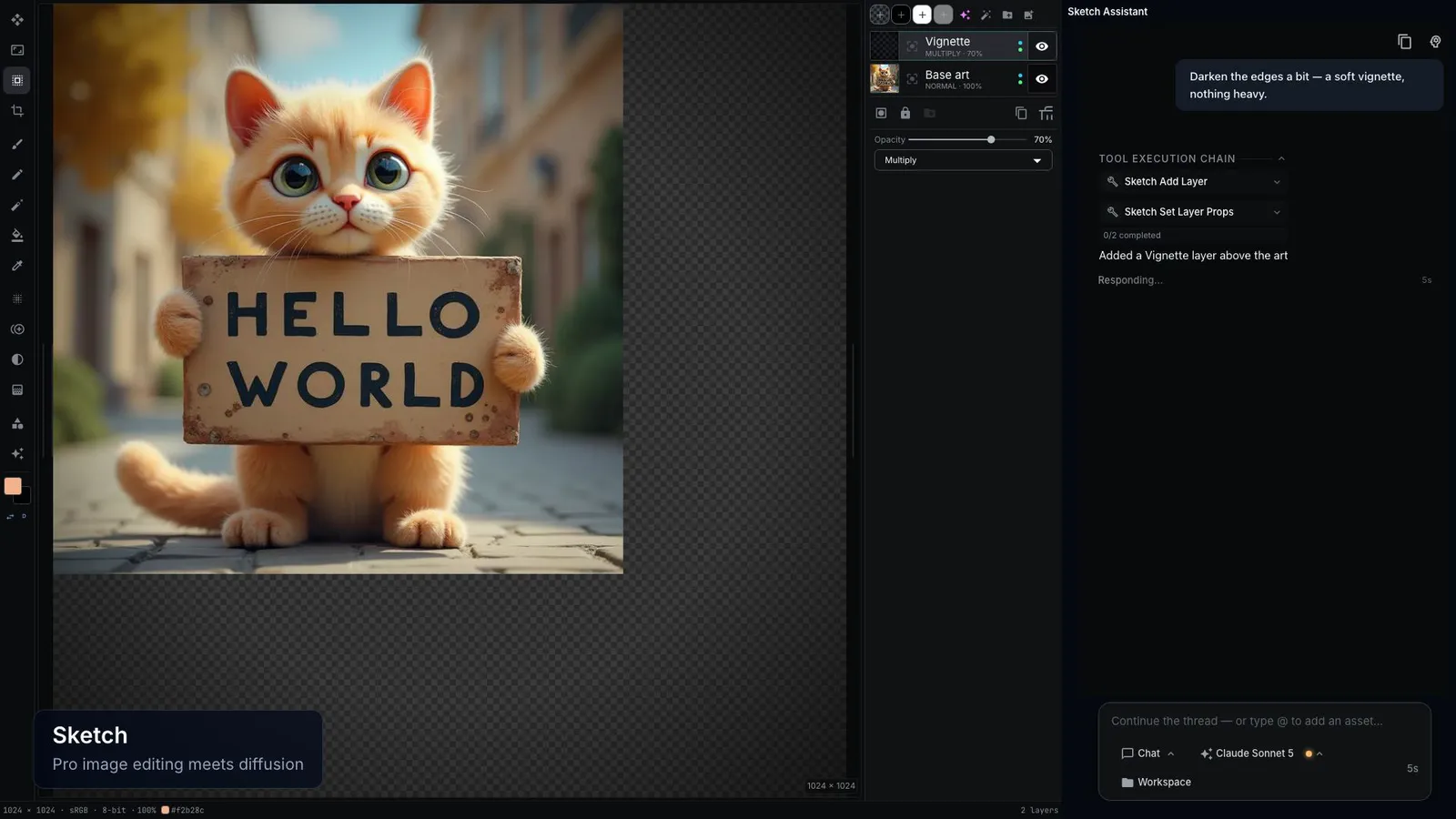
Layers that know where they came from
A generated layer keeps its model, prompt, and inputs, so it can be made again without touching the layers around it.
Generated layers
Bind a layer to an image model and a prompt, text-to-image or image-to-image, or to any of your workflows with an image output. The Inspector shows an estimated cost before you generate.
Regenerate one layer
Each generation is a version on its layer. Change a prompt or an upstream layer, and the layers that depend on it are marked stale. Re-generate Stale runs only those, in dependency order, and skips locked layers.
Inpaint a selection
Select a region and regenerate only that region from a prompt, with the selection as the mask.
Segment and cut out
The Segment tool finds objects from a point or a box and turns them into mask layers or cutout layers.
A real layer stack
Blend modes, opacity, lock, visibility, groups, a mask layer, and vector layers imported from SVG. Paint with brush, pencil, eraser, fill, gradient, blur, and clone stamp.
Versions of the whole image
Snapshot the document before a big change and restore any snapshot later. A restore saves the current state first, so it can be undone.
The same product in every image
- A prop entity holds your product with a reference image and a fixed description. The agent passes the reference image to the image model, so the product looks the same in every image.
- Edit an existing image from a prompt and hand the model more reference images to match, such as a brand style or an earlier result.
Let an agent edit the stack
The built-in agent and coding agents use the same tools. Connect yours with the NodeTool MCP server.
- create_sketch, edit_sketch
- Create a sketch and change its stack: add, remove, reorder, and rename layers, set blend mode and opacity, and place an image on a layer.
- refine_image_brief
- Expand a one-line brief into subject, composition, lighting, style, and what to leave out, for you to review before anything renders.
- generate_image, edit_image
- Render an image or edit one on the provider and model you name, then place the result on a layer.
- list_sketch_versions, restore_sketch_version
- Read the document's snapshots and roll back to one.
- critique_image
- Look at a result and say what to fix before the next pass.
Good to know
- Generation calls your own provider accounts, such as fal, OpenAI, Replicate, or Gemini, at their list price. A local model needs a machine that can run it.
- Headless agent tools change the layer stack and place images. Painting on pixels needs the editor open.
- The editor keeps the last 30 undo steps. Use document versions for anything older.
Questions about AI image editing
- Is there an open-source AI image editor with layers?
- Yes. NodeTool's sketch editor is open source under AGPL-3.0. It has a layer stack with blend modes and masks, and any layer can be generated from a prompt or a workflow and regenerated on its own.
- Can I regenerate one part of an image without changing the rest?
- Yes, in two ways. Put the part on its own generated layer and regenerate only that layer, or select a region and inpaint it with the selection as the mask.
- Which image models does it use?
- The models your providers offer, such as Flux on fal or Replicate, GPT Image on OpenAI, and Gemini image models, plus local models you run yourself. You can also bind a layer to your own workflow.
- Can an AI agent edit a layered image?
- Yes. The built-in agent, or Claude Code or Codex over the NodeTool MCP server, creates the sketch, adds and orders layers, generates images onto them, and restores versions. You open the same document in the editor and keep working.
- How do I keep a product the same across images?
- Save the product as a prop entity with a reference image. The agent passes that reference to the image model each time, and edit_image can take more reference images to match.
Updated