
Open-source AI video editor
The agent makes the cut. You keep editing it.
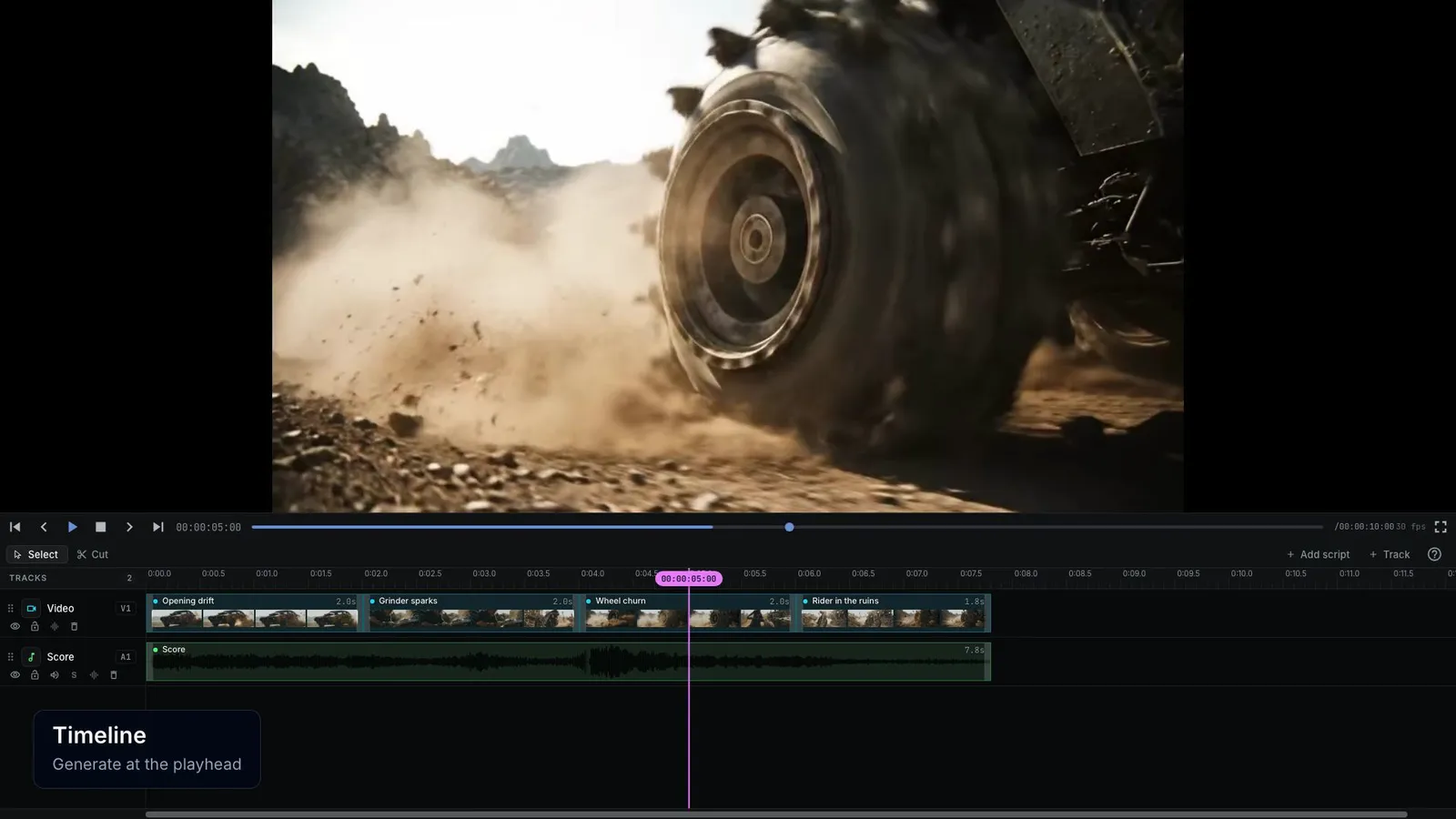
NodeTool is an open-source AI video editor where the agent's work stays editable. The agent plans a storyboard, renders each shot on the video model you pick, voices the script, and assembles a multi-track timeline. You open that timeline, swap a take, trim a cut, or regenerate one shot without rendering the rest. Use the built-in agent, or connect Claude Code or Codex over MCP.
From brief to finished cut
Each step leaves a document you can open. The agent can run all of them, or you can take over at any step.
Plan the shots
A storyboard holds the scenes and shots, each with its camera, prompt, and duration. The agent can write it from a brief or a script, and you can edit any shot on the board.
Keep characters consistent
Entities hold a character, location, style, or product with a reference image and a fixed description. Cast them on the board, and every shot that uses them gets the same reference.
Render stills, then clips
Render a still per shot, pick the best take, then animate it on an image-to-video model or render straight from the prompt. Each render keeps its takes, so a better earlier take is one click away.
Voice the script
A script holds the lines and voices. Voice all lines, and a line you change is marked stale so only that line is voiced again.
Cut the timeline
Create timeline turns the board and the voiced script into a multi-track sequence. From there it is an ordinary edit: trims, transitions, titles, captions, music, and keyframes.
Deliver every format
Adapt format makes 9:16, 1:1, and 4:5 versions of the sequence in one step. Export MP4, WebM, or a PNG sequence, or hand the cut to Premiere Pro.
A real multi-track timeline
- Video, audio, overlay, subtitle, and MIDI tracks.
- Image, video, audio, text, shape, 3D model, group, and adjustment clips.
- Trim, split, ripple and roll edits, three drop modes, snapping, markers, and J/K/L shuttle. Keyboard layouts for NodeTool, Premiere Pro, and Final Cut Pro.
- 12 transitions, including crossfade, wipe, push, zoom, whip, glitch, iris, and light leak.
- Text and caption styles, subtitle tracks, motion presets, keyframes, speed, and time remapping.
- Clip effects such as color, blur, glow, chroma key, curves, LUT, and grain, plus audio gain, EQ, and compression.
- Generated clips stay bound to the workflow that made them. Change a setting and only that clip is flagged for regeneration, with its earlier versions kept.
Let Claude Code or Codex edit the video.
The built-in agent and external agents use the same tools. Connect yours with the NodeTool MCP server.
- create_storyboard, edit_storyboard
- Write and revise the board: scenes, shots, camera, style, and cast.
- render_storyboard_stills, render_storyboard_clips
- Render the shots that still need it, or only the stale ones, on the model you name.
- voice_script_lines
- Voice every draft or stale line, each with its own voice.
- assemble_storyboard_timeline
- Turn rendered clips into a saved timeline.
- edit_timeline
- Change clips, tracks, text, effects, and timing in one checked edit.
- preview_timeline_frame
- Render frames of the composited cut so the agent can look at the result.
- render_timeline
- Render the finished sequence to MP4, WebM, ProRes MOV, or a PNG sequence.
Export
- Browser export
- MP4 (H.264), WebM (VP9 with optional alpha), or a PNG sequence, encoded in the browser with WebCodecs. MP4 needs a browser that can encode H.264.
- Server render
- MP4, WebM, MOV (ProRes), or a PNG sequence, from the editor or with render_timeline.
- Premiere Pro
- An FCP7 XML file with the media. Text, shapes, captions, effects, animations, transitions, and fades do not carry over.
- Project files
- Export the timeline as a project zip, or the whole project as one .nodetool-project file.
What it does not do yet
- Final Cut Pro (FCPXML) and DaVinci Resolve export are not available. Premiere Pro export drops text, effects, and transitions.
- The guided Video and Storyboard flows do not make on-camera speech. Lip-synced dialogue needs the agent, a character entity, a source face video, and a model that supports lip sync.
- Smart Reframe in Adapt format needs a subject track or authored framing for every visual clip.
- Without WebGPU the preview skips chroma key, vignette, and sharpen.
- Generation runs on your own provider accounts, so render costs are the provider's prices. NodeTool shows estimates on render buttons.
NodeTool is built for short films, ads, trailers, and explainers made from generated shots. For long-form editing and finishing, export the cut to Premiere Pro or work in a dedicated editor.
Example storyboards
Films made in NodeTool.
Each page shows the finished film, then every shot with its camera and direction.
- 21:9 · 4 shots
Film
Duel in the Wheat
Two swordsmen face off in a windblown wheat field. One strike.
- 16:9 · 5 shots
Film
The Long Hallway
A night-shift nurse sees something at the end of a hospital corridor.
- 16:9 · 5 shots
Film
Mars Greenhouse
An astronaut finds the first tomato ripening in a greenhouse on Mars.
- 16:9 · 5 shots
Film
The Interrogation
Two people, one table, one lie exposed in two lines of dialogue.
Questions about AI video editing
- Is there an AI video editor that keeps the project editable?
- Yes. In NodeTool the agent's storyboard, script, and timeline are the same documents you open and edit. Swap a take, trim a clip, change a line, or regenerate one shot, and the rest of the edit stays as it was.
- Can Claude Code edit a video timeline?
- Yes. Run npx -y --package=@nodetool-ai/cli nodetool mcp install to add NodeTool as an MCP server. Claude Code can then create storyboards, render shots, voice a script, edit the timeline with edit_timeline, look at frames with preview_timeline_frame, and render the cut with render_timeline. The timeline opens in Studio like any other.
- Which video models does it support?
- Veo, Kling, Seedance, Sora, Hailuo, Wan, and others, through providers such as fal, Replicate, and KIE on your own keys. You pick the model per board or per shot, and you can switch models without changing tools.
- How do I keep the same character across shots?
- Create a character entity with a reference image and a description, then cast it on the storyboard. Every shot that uses the character gets the same description, and models that accept reference images get the image too.
- Can I change one shot without regenerating the whole video?
- Yes. Each shot renders on its own and keeps its takes. Regenerate or revise one shot, choose the take you want, and the timeline uses it. A changed workflow setting flags only the clips it affects.
- Is it free and open source?
- NodeTool Studio is free and open source under AGPL-3.0, and runs on macOS, Windows, and Linux. Video generation calls the providers you connect, and they bill you at their own prices.
- Does it replace Premiere Pro or DaVinci Resolve?
- No. NodeTool covers generation, assembly, and a capable multi-track edit for short pieces. For long-form editing, grading, and finishing, export the cut to Premiere Pro.
Studio is free and open source. Connect the video models you already pay for and keep every project editable.
Download NodeToolUpdated