
3D blockout
Direct the camera. Let the model paint the shot.
A prompt cannot hold where every car is or how the camera moves. A grey 3D set can. Film it on the timeline, and a video model follows your camera, your cuts and your staging.
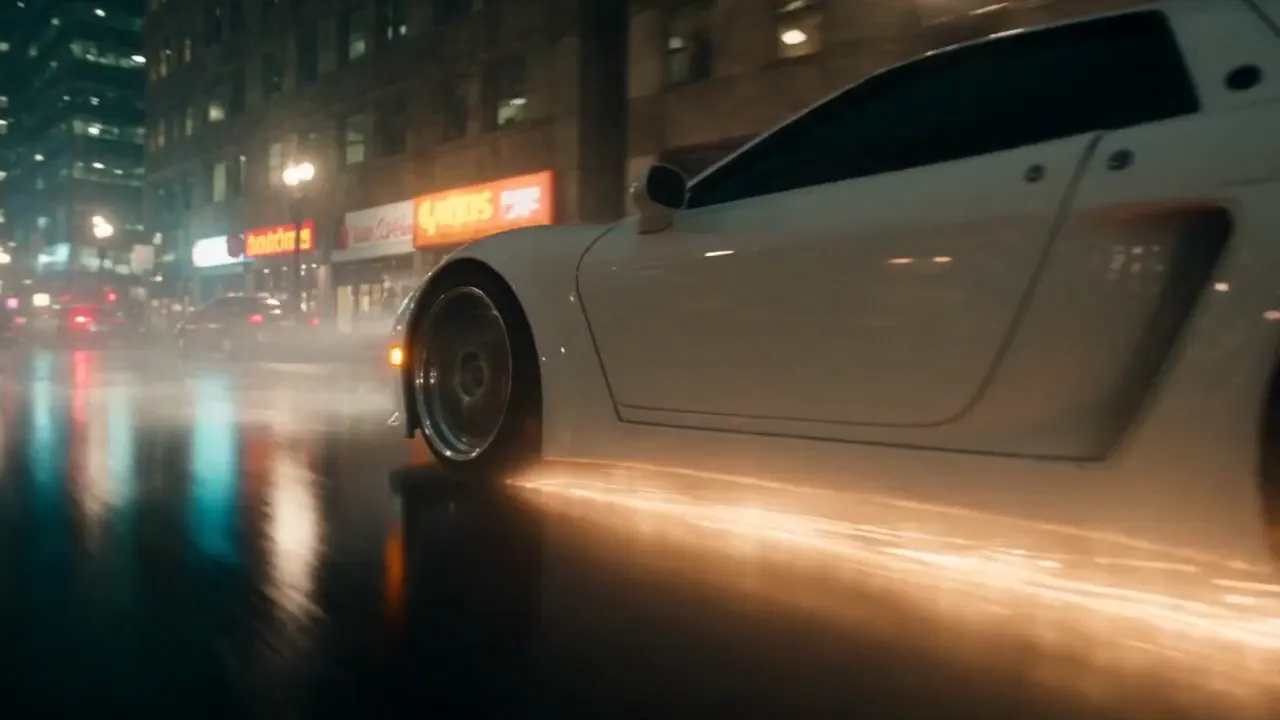
The blockout and the render, frame for frame
Top: the 30-second blockout, one 3D clip with 19 shots. Bottom: Dreamina Seedance 2.5, given the blockout as reference video and a prompt for the look. The render keeps the blockout’s cuts and camera moves.
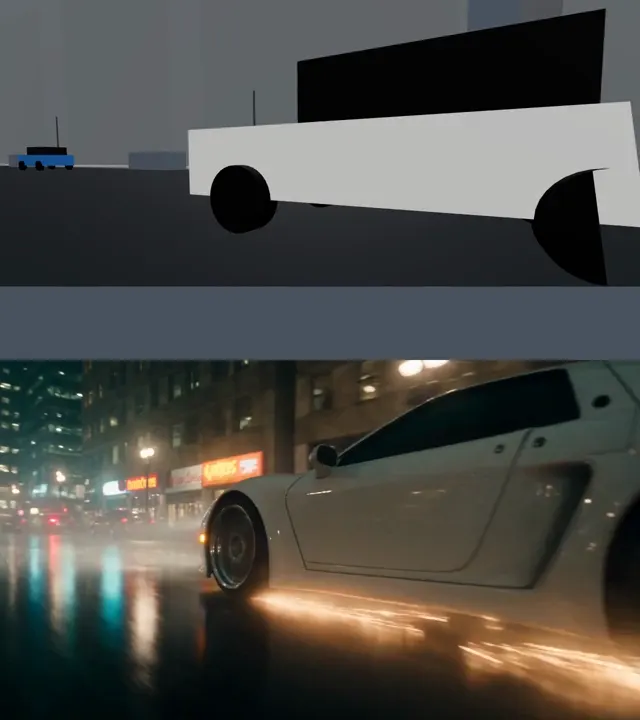
2.9 s Low tracking shot beside the rear wheel
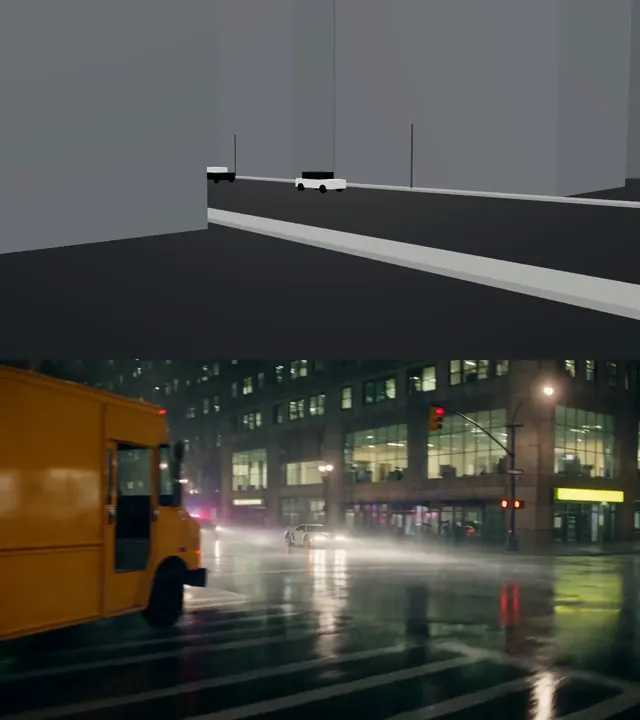
10.2 s The truck reaches the junction
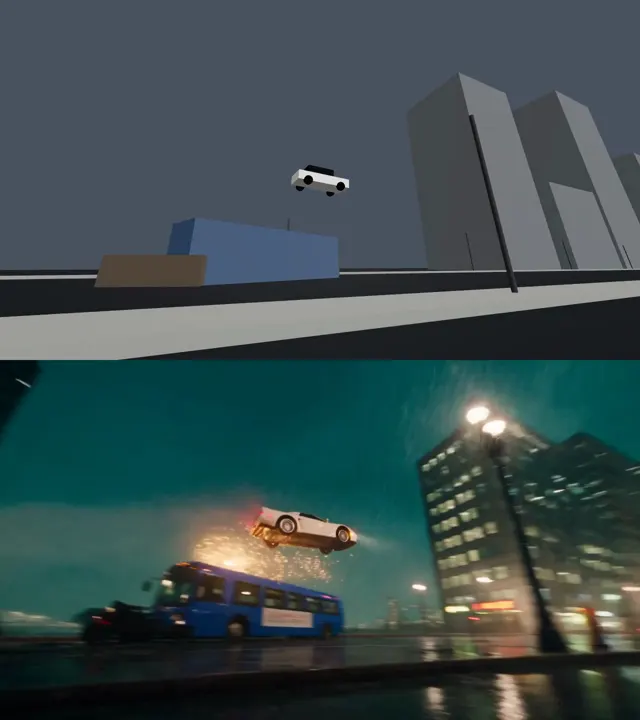
21.9 s The jump over the bus, from the ground
From grey set to finished shot
Each step is a document you can open and change. Move one camera key, and only that shot changes.
01
Build the set
Boxes, planes and posed figures at real scale, in meters. A car is 4.5 m long and a door is 2 m tall.
02
Film it on the timeline
A 3D clip carries a free camera: an eye, a target and a lens. Key it at any time, and put a cut between two keys one frame apart.
03
Apply camera moves
Push in, orbit, crane, truck, dolly zoom and five more presets. Each move starts where the last one ended.
04
Check the frames
Render clay, depth or normal frames at any timecode and fix the set or the camera before you pay for a clip.
05
Send the reference
The rendered grey video goes to a model that takes reference video. The prompt describes the look, and the reference fixes the camera and the staging.
Ten camera moves
Each move takes an amount in its own unit, degrees or a fraction of the distance, and a start time, a length and an easing.
- pan
- tilt
- orbit
- dutch
- pushIn
- truck
- crane
- pedestal
- dollyZoom
- zoom
The agent can block out the shot
The built-in agent and external agents use the same tools, with no editor open. Connect yours with the NodeTool MCP server.
- edit_model3d
- Adds boxes, figures, lights and cameras, and sets transforms and colors.
- add_model3d_clip
- Places the 3D model on the timeline with a free camera.
- apply_model3d_camera_move
- Applies one of the ten camera move presets over a time span.
- preview_timeline_frame
- Renders clay, depth or normal frames, or a contact sheet, for review.
- render_model3d_reference
- Stores the grey reference video on the clip and returns a one-sentence camera description.
What it does not do yet
- Figures have five poses (stand, sit, walk, run, lie) and cannot move along a path. The cars in the chase move by a glTF animation that a script wrote into the model.
- The reference fixes layout and camera only. The video model invents every surface, so it can swap details: in the first render of the chase it drew the police car as a white sports car, and that shot was rendered again with a stricter prompt.
- The reference render is clay, depth or normal. A colored reference, like the one in the chase, is rendered outside the timeline export.
- The longest side of a reference is 1280 px.
Questions about 3D blockouts
- Which video models follow the reference?
- Any model that takes a reference video. The chase on this page used Dreamina Seedance 2.5. For a model that takes no reference video, the clip returns a one-sentence camera description to put in the prompt.
- Do I need to know 3D software?
- No. The set is boxes, planes and posed figures, and the agent can build it from a description. The camera uses film terms: lens in millimeters and moves such as push in and orbit.
- Can a cut happen inside one 3D clip?
- Yes. Put two camera keys one frame apart. The chase on this page is one 30-second clip with 18 cuts.
Studio is free and open source. Block out your next shot and send it to the video model you already use.
Download NodeTool